A few months ago, I started seeing inexpensive LED curtains hung up around town for the holidays. Up to now I’ve only worked with individual strands of neopixels, I thought a grid like this would be really fun to use for more complex animations.
I ordered a 400 pixel LED curtain that runs on 5 Volts, and started thinking about what to do with it. The first question with a 2 by 2 meter unit is where to put it. After a few minutes walking around the house with a tape measure, I decided to use it to upgrade the lightshow installed in the upstairs study. This is mounted on the underside of a lofted storage area in our study, which is just the right size.
The parts for the project sat on my desk for a bit. I realised a few days ago that I was running out of time to build it before it gets too light to enjoy it in the evenings.
When I unboxed the LED curtain, I tried it out briefly with the included controller. It’s nice, I especially like the equalizer that responds to music, but I really didn’t want something someone else wrote with its own microphone, app and bluetooth. I’d rather make something that’s only exactly as smart as I want it to be.
So, after making sure the curtain worked, I started modding it. I cut off the controller, separated and stripped the three wires that power and control the curtain. Thankfully, although the wiring wasn’t covered in the product page or manual, it turns out it uses the same convention as the 10 meter strand of lights that comes with the Plasma 2350 starter kit, and the wires can just be screwed into the terminals on the Plasma 2350.
I created a project skeleton based on the previous code. I then updated it for the curtain, and added code to output a simple test pattern. I installed the curtain and the test code in the study:
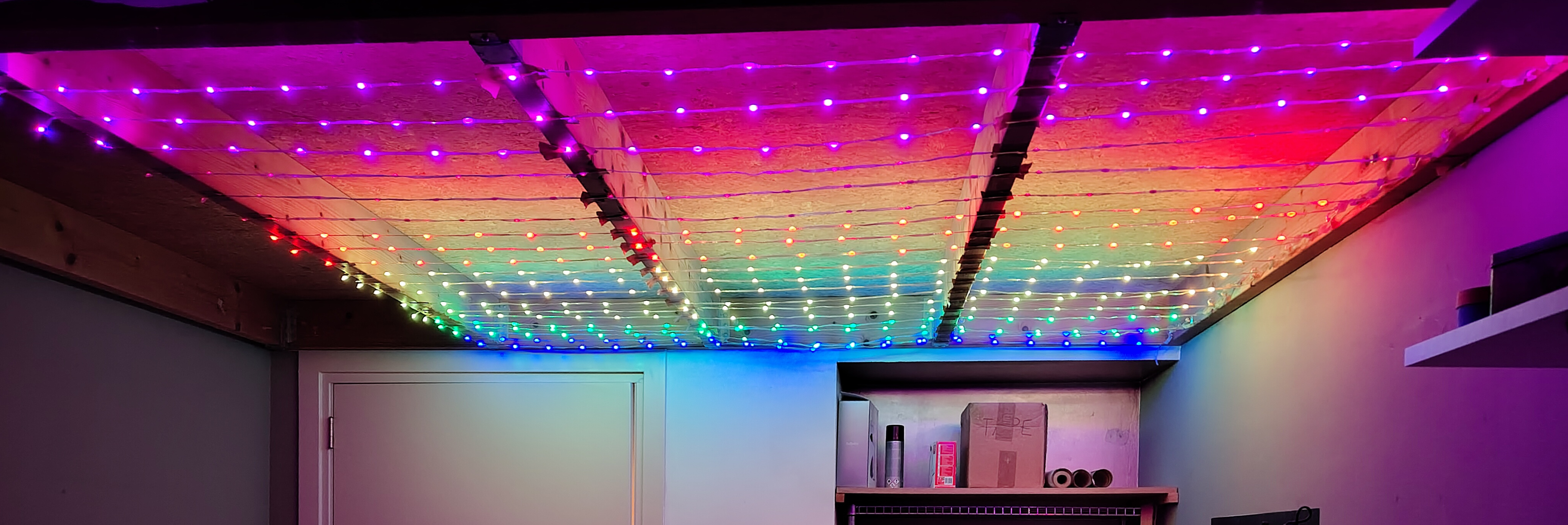
As I hoped, the lights fill the space nicely without being overpowering. Now I just needed to design and write the real software.
The Idea behind the Code
I’m usually happy to lean into the “gridness” of things like the Novation Launchpad (see previous work). For many projects, like my work with guitar fretboards, it’s a good fit. Sometimes, though, for the sake of variety I’ll make something like the Polar Vortex that works a bit differently.
In the Polar Vortex, there are multiple points orbiting around a single centre of gravity. Their position is tracked using polar coordinates, i.e. the distance from the centre and the current angle. To animate them, I simply update the distance and/or angle based on the rotation speed and the strength of the centre of gravity.
When displaying these points on a grid, I used antialiasing to split each point’s energy between each of the cells it overlaps with. This gives less the appearance of a “pong” ball moving through the grid, and more the appearance of a small spotlight.
For the aurora, I wanted to extend this idea and use multiple spotlights with different orbits. Here’s a rough diagram of the initial model, simplified for the purposes of illustration:
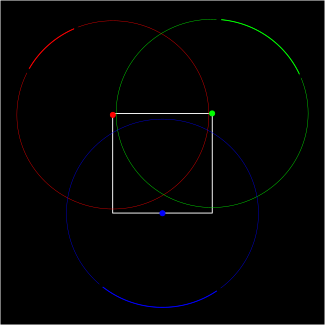
Each colour channel (red, green, blue) orbits around its own centre of gravity, and their orbits are arranged to periodically overlap. Unlike in the diagram, in the real unit, each spotlight will be big enough to fill most of the grid/square. The colours mix wherever the spotlights overlap. Since the spotlights orbit at different speeds, there should be a nice variety of colours and patterns.
I mocked up the initial code in Javascript, which you can try here:
See the Pen Three Body Aurora by Tony Atkins (@duhrer) on CodePen.
The First Version
I then wrote the same rough code in my C project and installed it on the Plasma 2350 unit powering the LED curtain. Although it was very nice, it tended to have long periods with entirely dark LEDs, which felt a bit too much like trying to catch the sun on a cloudy day. Everything would get noticeably dark at random moments, as you can see in this hyperlapse:
The Second Version
To address the dark spots, I decided to update my design to add additional spotlights:
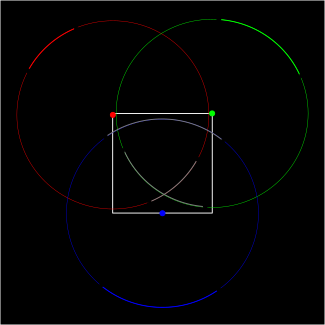
The new spotlights have two key properties: First, they’re kind of like the old idea of a Counter-Earth. They share the same orbit as another spotlight, but are on the other side of the centre of gravity (i.e. 180 degrees apart).
The second key property is their colour. Rather than repeating the colour of their partner, each of these “ghost” spotlights is a soft grey, intended to fill in and mix nicely with both the coloured spotlights and the other “ghosts”.
Here’s an updated version of the Javascript simulation:
See the Pen Six Body Aurora by Tony Atkins (@duhrer) on CodePen.
This turned out to be exactly the ticket. When all three coloured spotlights mix, you end up with a nice mixture of pearly colours. When coloured spotlights mix with “ghosts”, the effect is the same but a bit more muted. Because the amount of light varies less, the overall effect is more of a gently pulsing aurora, which was exactly the goal.
Here’s a quick demo video:
Like the previous version, this installation has an IR receiver and supports solid colours as well as the “aurora” pictured above. This means it doubles as a fill light and reading light, and with 400 lights, it nicely brightens up the space. I’m pretty pleased with it.
If you’re curious, the code and the materials I used are in a repository on GitHub.
What’s Next
I’m glad to get this one off of my desk, but am also glad to have started coding again. I plan to move on to writing projects for the dual-USB board my friend designed and sent me. Stay tuned for whatever’s next.